EasyE4 programmable relay (part 1)
EasyE4 programmable relay (part 1)게시 날짜: 05-02-2021 업데이트 날짜: 10-04-2026 🕒 10 읽기 시간

- Work environment of easyE4 by Eaton Electric
- Relays from the EasyE4 series – selection
- Software development for easyE4 using easySoft 7
- Function blocks – library and user-blocks
- EasySoft 7 for practitioners: installation and first launch
- Running the licensed software
- People counter built based on the easyE4 relay
The strength of many modern devices lies in their software. This applies in particular to industrial controllers, programmable relays and single-board computers.
Using commercially available electronic components it isn’t difficult to build a programmable controller or relay. However, it is much more difficult to develop the user interface and a set of software tools that will make it easy to use.
While easyE4 looks very much like other devices of this type, the utility software is its undeniable strength. It not only gives the user the ability to use various programming methods and simulate the work of the finished application, but also provides many ready-made function blocks, among which we can also find modules that were previously available only in much more expensive PLCs.
When planning to learn how to complete the application of a PLC or programmable relay, it is good to find a problem to solve, then select components, and step-by-step learn from the example and execute the intended solution. Any software bugs can be removed over time thanks to subsequent updates, whereas through learning from an example, we benefit from a double gain. Firstly, we do useful work, and secondly, we learn and remember new techniques that can be used in the future.

EASY-E4-DC-12TC1 programmable relay
Modern programmable devices, PLCs and their little brothers, programmable relays, offer one important advantage. Namely, in many cases the optimisation of the programme is not a key issue which would determine proper functioning. Of course, it is worth ensuring that the programme is written in the best possible way, but modern processor systems have such extensive resources and are so fast that even a suboptimal program will have a chance to meet the user's requirements. There are advantages and disadvantages to this, but we won’t consider them at this point.
Work environment of easyE4 by Eaton Electric
The software for the easyE4 programmable relay offered by Eaton Electric is developed using the easySoft 7’s development environment. Its demo version can be downloaded for free, while the commercial version is easiest to purchase together with the EASY-BOX starter kit, including the selected easyE4 controller model, an Ethernet cable for programming and a license key.
With such a development environment – because that is what easySoft 7, offering an extensive range of functionalities, should be called – you can develop the relay software using one of 4 methods, but also simulate its operation, track variables, waveforms, etc. The individual functions will be described later.
The development environment has been adapted to the capabilities of the programmable relay, which have long gone beyond the functionality offered by a mechanical or even electronic relay, based on adjustable timer systems. The latest generation of programmable relays is capable of triggering individual functions by means of zero-one digital signals. It can also be used for the measurement and conditioning of analogue signals on the inputs, building extensive networks using standard interfaces, exchanging data with “large” PLCs, and widely understood variable processing, for example, converting a digital value into an adequate PWM waveform, and after adding an uncomplicated filter, also into an analogue value. Most of these functions were once reserved only for conventional PLCs, but today they can be successfully realised by the easyE4 driver.
Relays from the easyE4 series - selection
The family of easyE4 programmable relays currently includes 12 items with slightly different capabilities, power supply, type of connectors, presence of a display and a number of buttons on the panel. The great thing is that when starting a project, you only need to have a general orientation, and choosing a specific type is easier thanks to the easySoft 7 development environment itself, in which, before starting the project, available models of time relays are listed on the left side (Base devices). After selecting one of them, a detailed description will be shown on the right side, including basic parameters, value of the supply voltage, number of inputs/outputs (including analogue ones), etc. Additionally, after clicking on the name, we will be redirected to the manufacturer's website containing detailed information. The choice is also facilitated by miniature icons that allow you to determine at a glance whether a given model is equipped with a display or not.
The nomenclature used by the manufacturer facilitates the process of selecting a programmable relay for a project. The type designation consists, among others, of:
- Relay model name, here: EASY-E4.
- Indications of the type of supply voltage (UC – direct or alternating, DC – direct, AC – alternating. Note: models with “AC” in the name do not have analogue inputs).
- The total number of input/output connectors (in the easyE4 line it is 12).
- Type of output (R – relay/relays, T – transistor/transistors).
Each programmable relay model includes a real-time clock with a battery backup. The inputs/outputs have screw (“1” in the name) or push-in (“1P” in the name) terminal connectors. If a given relay model doesn’t have a display and buttons for menu operation, then the letter “X” appears in its name.
Software development for easyE4 with easySoft 7
The easySoft 7 development environment is unique, and Eaton has made a wide range of possibilities available to users. While competing products can be used to execute applications using the FBD and LD, in easySoft 7 we will find two additional possibilities: ST structural language and, slightly less extended, proprietary EDP diagram, known from earlier products, which not only allows for a quick “switch-over” to a new product, but also ensures backward compatibility if you need to replace an older relay model.
One of the most important advantages of the easySoft 7 environment is the availability of pre-programmed function blocks that can be easily configured to suit your needs. In earlier models of programmable relays, the blocks were primarily intended for simple on/off building automation applications, such as switching lights on/off at a specific time of day. Currently, they can also be successfully used in industrial automation, because their definitions include, among others, blocks of PID controllers, analogue value comparators, arithmetic modules, frequency meters, programmable counters and others.
Function blocks – library and user-blocks
If you are used to the limited possibilities of programmable relays, the set of function blocks available in the easyE4 series may come as a surprise. For example, if we analyse the description more carefully when choosing a relay model, we will find, among others, the following blocks:
- IC – interrupt triggered depending on the counter reading.
- IE – interrupt caused by the edge of the input signal.
- IT – interrupt triggered by the real-time clock.
These types of interrupts allow for very effective management of the available computing power, for performing specific tasks when they should be performed, without tedious querying of the I/O status.
In addition to an extensive library of function blocks (pre-defined), it is also possible to create user function blocks (UFs) that can be integrated into any project and used repeatedly to add to the ongoing and other projects. You can also use blocks made by other people, which saves time, facilitates the construction of the installation and reduces the cost of project implementation. It is worth mentioning the possibility of extending the functionality of easyE4 with additional expansion modules, which puts it on par with older PLCs. In this way, the new product from Eaton Electric goes beyond the limitations of standard programmable relays, to become essentially a miniature PLC.
EasySoft 7 for practitioners: installation and first launch
The easySoft 7 development environment is available on many portals, but the manufacturer's website is the best source. Check available software versions from Eaton.
After clicking on the image of Eaton Software Download Center, you will be redirected to the application page, where you should click on Software, then easySoft, and then select the current, latest version (at the time of writing this text it was 7.2x) from the list. Now, in the displayed table, click on the name of the programme and wait for the installer file to be downloaded to the disk.
The downloaded file is of the .EXE type, so it is a Windows application. The programme is installed in standard manner and no user of this system should have any problems with it.
Running the licensed software
If you have purchased a software license, please visit the Eaton Automation website. Due to the open, unencrypted communication protocol (http instead of https), the Google Chrome browser classifies this website as potentially dangerous, so in order to open it, click on Advanced and allow the safety exception. Then, after clicking the Next button, enter the license number provided on the card available inside the starter kit packaging. After entering it, click Next again and select the type of account to be created: whether it is an individual or business customer. After clicking Next again, please provide your identification data. If the registration was successful, the license number will be sent to the e-mail address provided, which must be entered after easySoft 7 is launched.
The license key purchased with the starter kit is assigned to a registered user and it is not possible to transfer it to another person. Re-entering the key on the website will cause the license number to be re-sent, provided the given data matches that previously registered with Eaton.
People counter built based on the easyE4 relay
The idea of counting people in a room isn’t new. In the past, in the era of popularisation of digital circuits, it was built on the basis of integrated JK or D flip-flops. Now, with a device such as easyE4, we can build a people counter based on a programmable relay. Of course, this is only one of the solutions, but the use of easyE4 has many advantages – a ready-made microcontroller will allow for a quick use of our people counter, ensure the safety of users and quick and easy adjustments. In addition, our solution will be easy to duplicate, if necessary.
The people counter will be designed to signal that the permitted number of people in the room has been exceeded. It can also be used to automatically turn on/off lighting, ventilation, heating and other power receivers, the operation of which should depend on the presence of users in the room. As a light switch, it can be useful at the entrance to the basement, garage, bathroom. As a counter of people which signals that a pre-set number has been exceeded, it can be useful in rooms where restrictions have been introduced due to the risk of coronavirus.
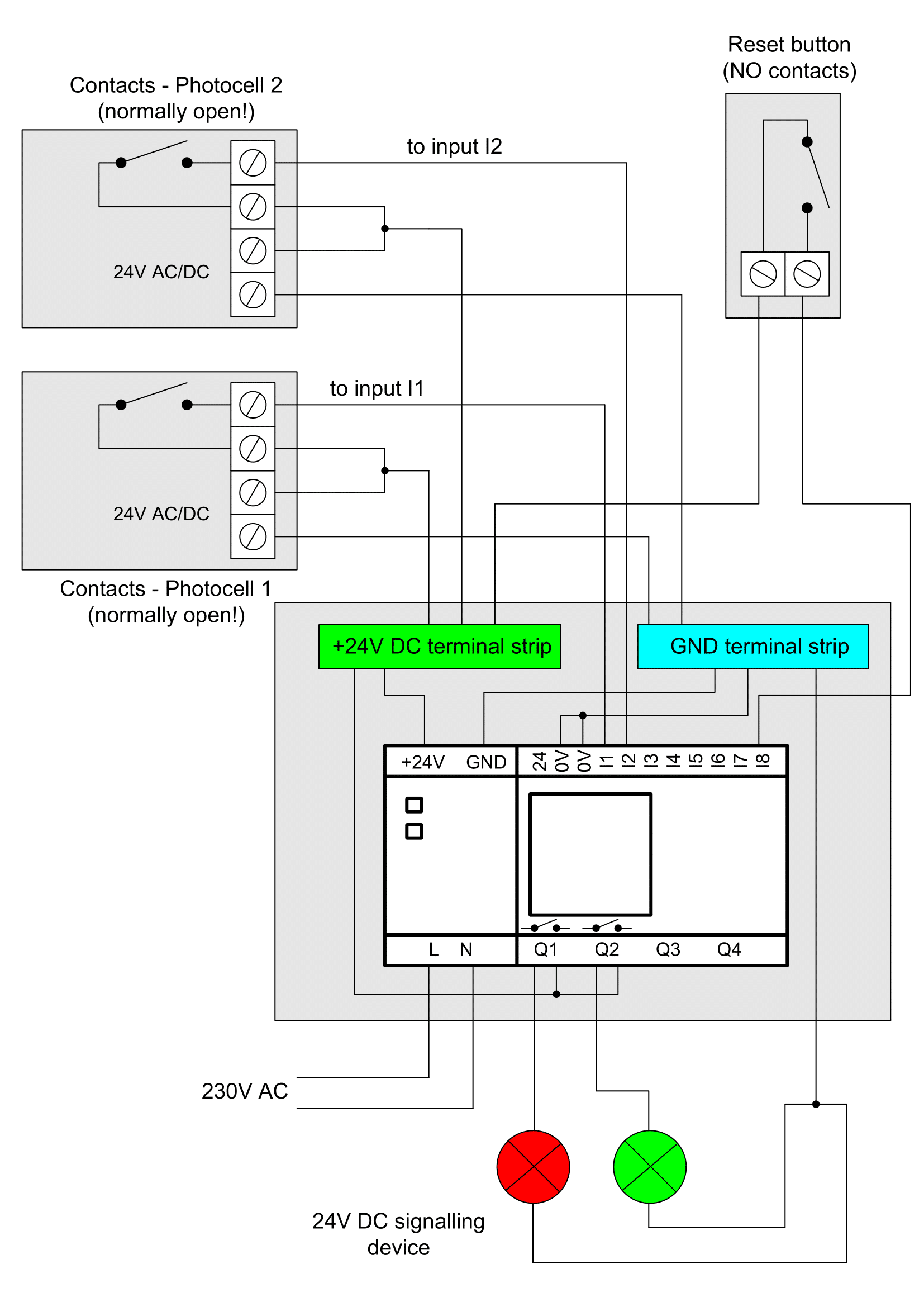 Figure 1. Illustrative diagram for a people counter with the EASY-E4-UC-12RC1 programmable relay
An illustrative diagram of the people counter is shown in Figure 1. An important element of the counter are two sensors (infrared, ultrasound barriers, photocells, etc.) whose contacts are open by standard. Typically in this function, infrared barriers, i.e. photocells, are used. They are usually used to prevent gates from closing. Photocells should be placed in the entrance or corridor at a distance of about 1 metre from each other, at a height of 60 cm to 1 metre from the floor, in such a way as not to interfere with each other's work (Figure 2).
Due to the fact that the EASY-E4-12TC, powered by voltage in the range of 12...24VDC, was selected for the application, the counter has a built-in 24V DC power supply which can be used to power cooperating external elements, for example the aforementioned photocells or a signalling device. The total current consumption by these elements should be adjusted to the load capacity of the power supply.
The counter increases/decreases the number of people inside the room on the basis of pulses occurring at inputs I1 and I2:
- The occurrence of an impulse at input I1 and then I2 increases the number of people in the room by 1. This corresponds to the covering/uncovering sequence shown in Figure 3.
- An impulse at input I2 followed by I1 reduces the number in the room by 1 (figure 4).
- The counter doesn’t react if the above-described sequence of impulses appearing on the inputs I1 and I2 isn’t maintained.
- If the number of people in the room is smaller than the permitted number, the Q1 output is inactive, while Q2 is active (thus, the Q1 and Q2 outputs can be connected to the 2-chamber signalling device).
- If the number of people in the room is greater than or equal to the permissible number, the Q1 output is active, and the Q2 output is inactive.
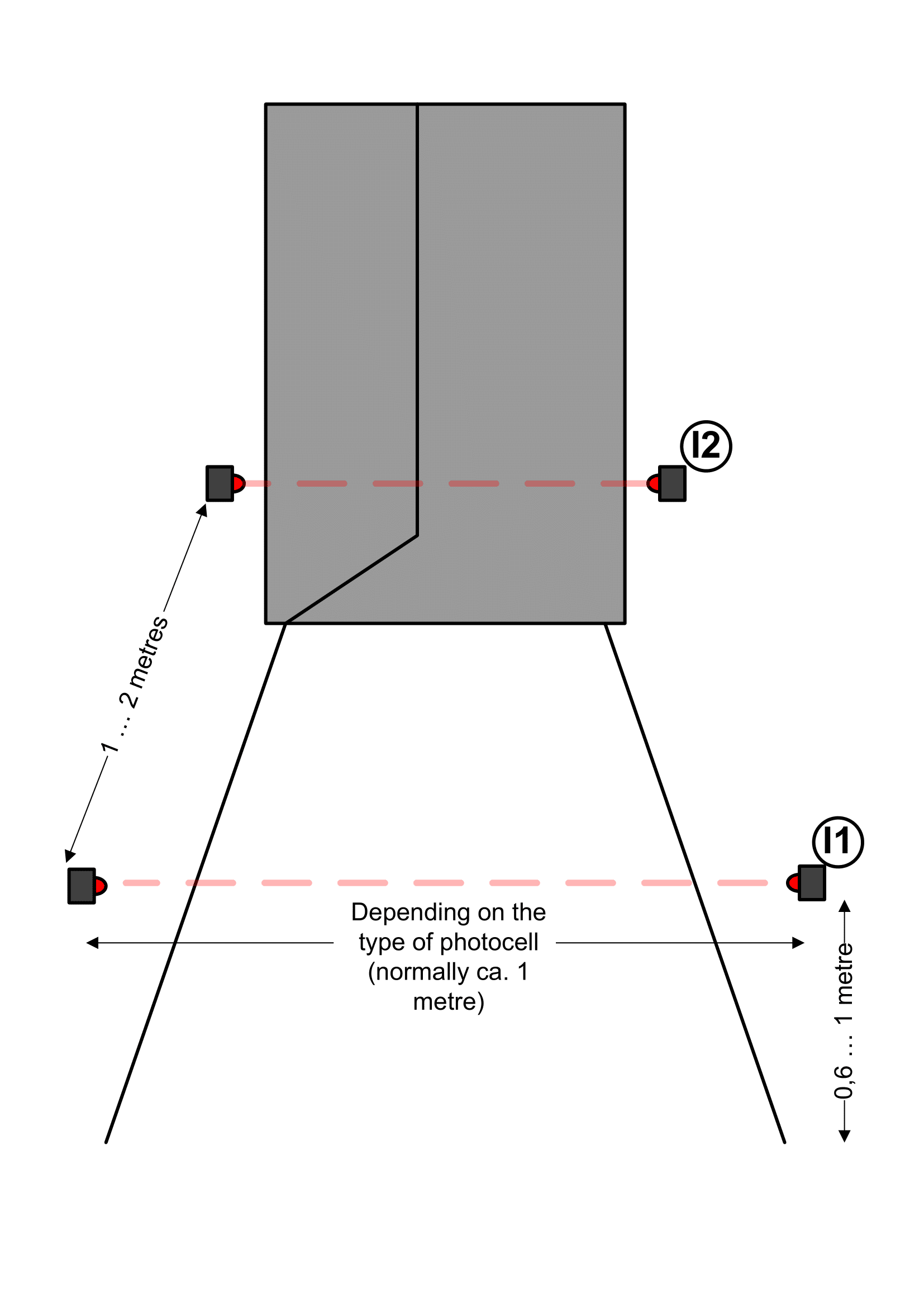 Figure 2. Layout of barriers working as sensors for a people counter
As the described diagram of a people counter is an example of an application, the solution uses a programmable relay with transistor outputs, to which signalling elements or actuator relays with high operating voltage and load current are connected. An equally good solution will be to use a programmable relay marked as EASY-E4-UC-12RC1 with relay outputs, which will simplify the construction of the device. The application assumes that we will have universal, potential-free relay outputs that can, for example, be connected in parallel to a lighting switch.
We can also make a simple user interface in the meter. The set and current number of people will be shown on the display that is built into the easyE4 controller. We will also provide the option to set both numbers with the cursor buttons and show a message informing us about the status of one of the outputs, Q1 or Q2.

Figure 3. Sequence of covering/uncovering sensors increasing the counter reading
 Figure 4. Sequence of covering/uncovering sensors decreasing the counter reading
Transfer Multisort Elektronik (TME)은 전자 부품, 전기 기술 부품, 작업장 장비 및 산업 자동화의 세계 최대 글로벌 유통업체 중 하나입니다. 카탈로그에는 1,300개 주요 제조업체의 1,500,000개 이상의 제품이 포함되어 있습니다. Łódź와 Rzgów (폴란드)에 있는 TME의 현대적인 물류 센터는 총 면적이 40,000 m² 이상이며 매일 약 6,000개의 패키지를 150개국 이상의 고객에게 발송합니다.
TME는 또한 TME Education 프로젝트를 통해 젊은 엔지니어와 전자공학 애호가들의 지식과 기술 개발에 투자하고 있으며, TechMasterEvent 시리즈를 조직하여 혁신과 경험 교류를 촉진하면서 기술 커뮤니티를 지원합니다。